Automate Every MFA Code Without Changing How Your Firm Works.
From June 2026 every Government Gateway agent login requires an MFA code. Shared credentials, single phones, manual workarounds are all nightmare on tax street waiting to happen.

My1Login automates the entire flow. One click. No user training.
Thank you! Your submission has been received!
Oops! Something went wrong while submitting the form.

HMRC warning pages go live 7 April 2026. Mandatory registration from May. Full enforcement from end of June. Your ASA and legacy agent accounts are both in scope.

Your Shared Logins Are About to Break.
One Phone Holds Up the Entire Firm
Every MFA code goes to one registered device. When that person is in a meeting, on leave, or at lunch, your entire team is locked out of HMRC. No filing. No client work. No progress until they pick up.
Every Workaround Is an Audit Failure
Your team will adapt: Teams chats or WhatsApp groups to share codes, sticky notes on monitors, shouting across the office... Every workaround they invent is a compliance violation waiting to surface. You have replaced one security problem with another.
Hundreds of Codes a Day
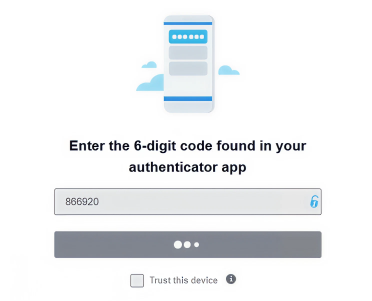
A mid-size firm logs into Government Gateway dozens of times daily. That is hundreds of MFA prompts per week. Each one requires someone to check a phone, read a six-digit code, and type it in before the 30-second window expires. At scale, manual handling is not a workflow. It is a collapse.
Get It Wrong and Get Locked Out
Enter the wrong code too many times and Government Gateway freezes the account. Firms have reported resolution times of up to six weeks. Imagine telling your clients you're locked out of the Gateway while they panic about their deadlines.
Fix This Before June
Your Phone Generates the Code.
You Still Have to Enter It Yourself.
Government Gateway isn't just 'hard to use.' It's explcitly hostile to your tools and workarounds, and your current vendor has no answer.
Government Gateway Breaks Standard Tools
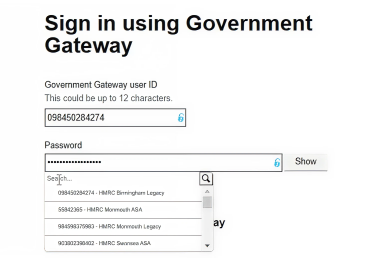
Government Gateway uses a non-standard 12-digit User ID, silently truncates passwords to 12 characters, and requires navigation from another GG page to reach the login screen. Most password managers fail before the MFA step even begins.
Generating a Code Is Not Entering It
Your tool shows you six digits. You still have to open the app, find the right account, copy the code, switch to the browser, and paste it before the 30-second window closes. That is not automation. That is a faster manual process.
Desktop Apps Are Completely Invisible
Your firm runs on Sage, QuickBooks Desktop, and legacy payroll systems that live outside the browser. Your browser-only IAM cannot touch them. Those apps have no SSO, no audit trail, and no off-switch when someone leaves.
See What Automation Looks Like
MFA Code Generated and Entered. You're In the ASA in One Click. Every Time.
We do not generate a code for you to enter. We generate it and enter it. No human step. No bottleneck. No 30-second race.
Full MFA Automation
Your team selects the required Government Gateway account from a searchable list. My1Login handles the rest: credentials entered, MFA code generated, code auto-filled, login complete. The user never sees a code, never waits for an SMS, and never touches an authenticator app.
Desktop App SSO
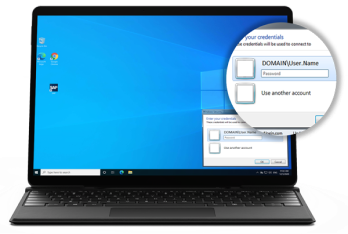
Full Single Sign-On for Windows desktop applications. If your team uses it, we secure it. My1Login is the only IAM that covers what accounting firms actually run on.
Invisible Adoption
My1Login deploys as an invisible layer on existing workstations. No new portal. No behaviour change. Your team works exactly as they do now. They just become secure and ten times faster.
Request a Demo
Manual MFA / Other Tools
MFA codes go to one phone, creating a firm-wide bottleneck
Shared codes via Teams, whatsapp or email create audit exposure
Standard password can't do 1-click login on Government Gateway's login flow
Desktop apps (Sage, payroll systems) remain completely unprotected
Leavers retain memorised credentials with no central off-switch
Commercial performance suffers as login friction erodes billable margins
No audit trail for who accessed which Government Gateway account, or when
MFA codes generated and entered automatically, no phone required
Credentials are never visible to users, eliminating the need to share
Engineered specifically for Government Gateway's non-standard flow
Desktop applications secured with 1-click access and audit trail
Acess to all apps and all accounts is revoked instantly for leavers
Complete audit trail across every login, every account, every user
Automated app and account discovery for all accounting apps, including desktop apps
Request a Demo
Convert Administrative Waste Into a Billable, Compliant Asset
This isn't a cost center. This is a direct, measurable impact on your P&L, starting in the first 30 days.
Increase Billable Capacity
Reclaim thousands of hours of lost productivity across your entire firm, directly increasing your billable capacity without adding headcount.
Win More Business
Move from a position of risk to a competitive edge. Prove to high-value clients that your firm has a superior, audited, and modern security posture.
Eliminate Leaver Risk
Gain a single, central "off-switch." When an employee exits, their access to all client accounts (Gateway, Xero, Sage) is revoked instantly.
Request a Demo
The Standard for High-Performance UK Accountancy Firms
My1Login is the only solution for accounting firms who understand the quantifiable cost of this problem and the failure of generic tools.
Peer Proof
Leading UK firms selected My1Login for one reason: it is the only solution that handles Government Gateway, automates MFAs, and secures legacy desktop apps (e.g., Sage).
Competitive Failure
Your current solutions fail on Government Gateway, fail on MFA auto-fill, and fails on desktop apps. Meanwhile your competitors are saving hours per head by streamlining this flow.
Industry Validation
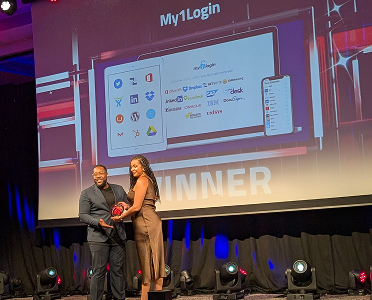
Repeatedly judged "Best Identity Management Solution" by SC Awards , validating the A+ rated, "suitable for use in defence" security architecture that underpins your compliance.
Full coverage for the 10,000+ applications your firm depends on
Sage
Xero
GOV.UK
Quickbooks
Workday
Salesforce
DocuSign
Oracle
Build Your Investment Case Now
Deploys in Days. Proves ROI in 30.
Our methodology runs invisibly, ensuring 100% adoption from day one.
“My1Login enabled us to eliminate a number of password-related security risks. We also now have a much clearer picture of Shadow IT systems in-use. There are definite benefits to both security and speed of access to applications.”
“My1Login has helped us identify around 600 business applications in-use and 100% of these are now integrated with My1Login’s IAM solution, providing Single Sign-on for these apps that is seamlessly linked to users’ AD profiles.
Calum McLean
Head of Innovation and Data, Natural Power
Financial Services Firm deploy My1Login’s Identity as a Service (IDaaS) to eliminate cyber risks by providing Single Sign-On and Passwordless authentication.
“One of the easiest technology implementations we've ever had to do.”
“The encryption keys themselves are not held by My1Login so it gave me confidence that the security was of the highest standard."
Neil Clark
Chief Operating Officer, Mainspring

30-Day Proof
We launch a pilot on your most-used Government Gateway accounts. One metric: MFA prompts eliminated. ROI is proven before you commit to a full rollout.
Zero Friction Rollout
Your team changes nothing. The platform runs in the background on existing workstations. No training sessions, no new portals, no change management.
Complete Audit Trail
Full visibility into who accessed which agent account, when, and from where. The answer you need when a client or auditor asks the question.
June Is Coming. One Click or Hundreds of Codes. Your Call.
There is one platform engineered to automate the entire Government Gateway MFA flow. It is already live. The only question is whether your firm is ready before the deadline.
Request A Demo